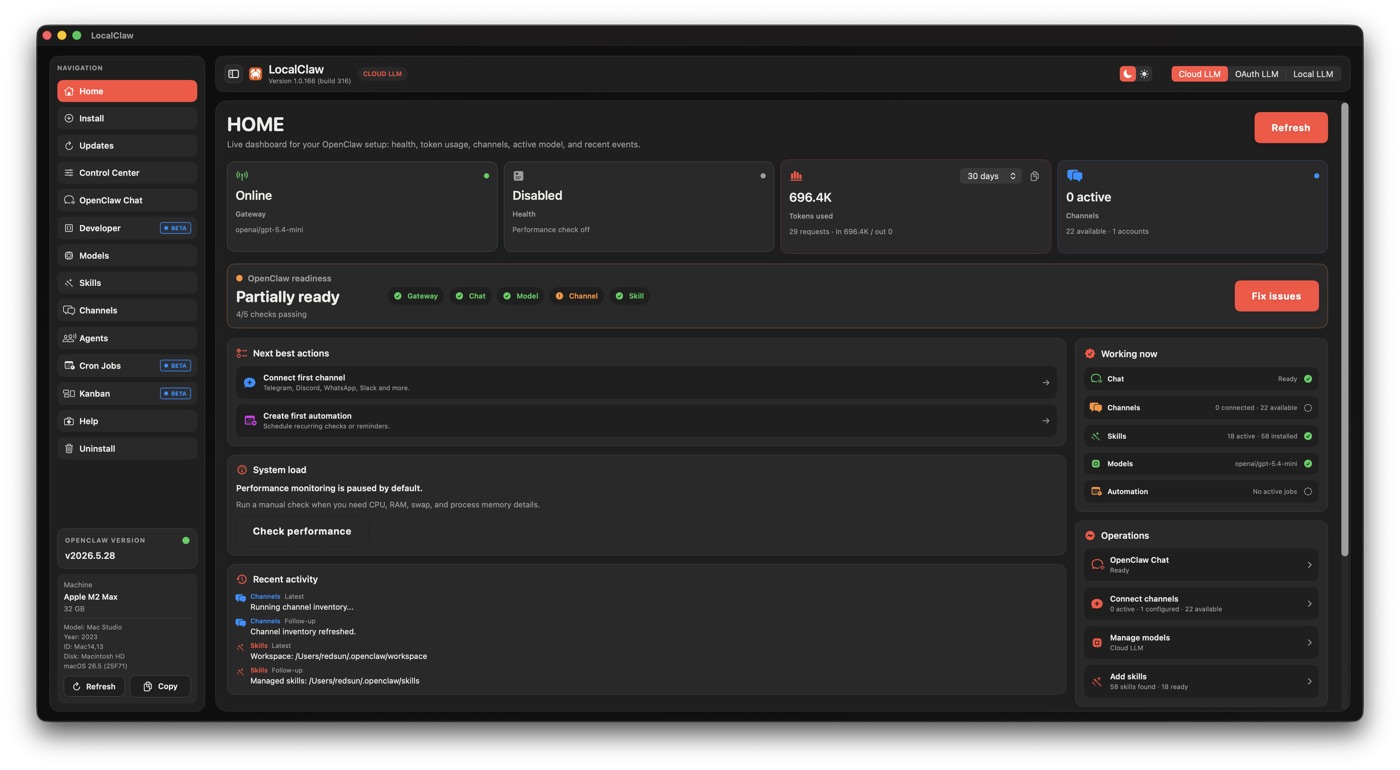
Guided setup · Models · Chat

LocalClaw · The native app for macOS

Your AI assistant.One Mac
app.

Set up OpenClaw with guided checks, choose a model and start your first conversation. LocalClaw brings setup, chat and everyday controls together on your Mac.

Apple Silicon only · macOS 13+ app · Apple-notarized DMG
Local models with LM Studio require macOS 14+.

LocalClaw v1.0.207 $49 one-time beta license No subscription

Your license key appears after payment. Download the app and activate it with your order email and key. OpenClaw itself is free and open source; LocalClaw is the optional native Mac app.

See what your license includes
Inside the LocalClaw Mac app

Your setup, models and work.
Within reach.

A native SwiftUI workspace brings the practical controls together, from your first install to your next project.

Keep the project in the conversation.

OpenClaw Chat brings project memory and image attachments into your native workspace, with your model choice close at hand.

Build with your workspace in view.

Developer workspaces, Git and GitHub actions, plus a local preview help connect a conversation to the project you are actually building.

Give recurring work a home.

Manage agents, connect channels, schedule cron jobs and organize Kanban tasks without scattering the controls across your workflow.

One-time beta offer
$49
lifetime

One payment for guided setup, model controls and conversations in a native Mac workspace. Your lifetime beta license includes LocalClaw app updates, with no LocalClaw subscription.

Apple-notarized Developer ID DMG, built to open cleanly with macOS Gatekeeper.
Native macOS app, delivered as a .dmg installer.
Guided setup for OpenClaw, LM Studio and local model workflows.
Updates included while the app improves through beta.
License key appears after payment, plus activation support.
Local inference with LM Studio; optional cloud and OAuth provider modes.

Secure Stripe checkout. Your license key appears after payment. No LocalClaw subscription.

1 · CheckoutPay once through Stripe.
2 · LicenseCopy the key shown after payment.
3 · InstallDownload and activate the app.

OpenClaw is free and open source. Optional third-party models, cloud services and API usage may have separate costs.

What you are buying

All your controls.
One native home.

LocalClaw gives OpenClaw a macOS control surface: setup, health, models, channels, agents and scheduled work in one place.

Control Center

Gateway health, CPU/RAM, tokens, readiness and repair actions.

Models

Switch between local, cloud and OAuth LLM modes cleanly.

Cron Jobs

Schedule OpenClaw jobs and see what runs, when and with which agent.

Agents

Create assistants, route work and keep model context visible.

Kanban

Organize tasks across backlog, ready, doing, review and done.

Chat, Skills, Channels

Beta workspace tools for local chat, integrations and channels.

Choose your way in

OpenClaw is free.
The native Mac app is optional.

Use the open-source project directly, or choose LocalClaw for native setup and everyday controls. Our web model recommender and hardware guides stay free too.

Free and open source

OpenClaw on your own

Install and configure OpenClaw directly using the project’s documentation and tools. You do not need to buy LocalClaw to use OpenClaw 2.0.

Explore OpenClaw
Paid beta app

LocalClaw for macOS

Get the native control center with guided setup, activation, update flows, model operations and email support.

Get LocalClaw - $49
LocalClaw 1.0.207 OpenClaw 2026.9.2

OpenClaw 2026.9.2 workflows tested. Install this LocalClaw release once, then get future app updates without dragging files in Finder.

Already using LocalClaw?
New in OpenClaw 2.0

More context.
More ways to get things done.

LocalClaw 1.0.207 adds in-app installation of future updates and fixes OpenClaw 2026.9.2 recovery, agent and model selection, Goals and automation status. The OpenClaw 2.0 highlights below remain part of the wider platform.

Explore the full release

Memory gets a bigger role.

The new memory system is a headline OpenClaw 2.0 change, helping turn useful context into something your assistant can work with beyond a single conversation.

Find the thread. Try another path.

Searchable conversations and branching make it easier to revisit work and explore a different direction without losing the conversation that got you there.

Go beyond a wall of text.

Interactive widgets give OpenClaw a richer way to present information and actions. A useful next step for assistants that can turn a response into something you can interact with.

Your assistant. Your model setup.

Explore the release’s local model direction, then use LocalClaw’s native model controls to configure LM Studio, cloud or OAuth modes for your own hardware and needs.

These are OpenClaw release highlights, not a promise that every upstream interface is built into LocalClaw. Availability depends on the OpenClaw runtime, interface, model provider and plugins. Experimental features, including Swarm, are not guaranteed in the native app. Read the official announcement.

For existing users

Your next update
starts here.

The order matters: update the Mac app before upgrading the OpenClaw runtime.

Get the latest LocalClaw
  1. Update LocalClaw to 1.0.207.

    On 1.0.206 or earlier, install this Apple-notarized DMG in Applications one last time. Your saved license stays in place. From 1.0.207 onward, use App update → Update. Update all handles dependencies and OpenClaw first, then installs and relaunches LocalClaw last. Automatic replacement needs a writable Applications folder; if the shared folder is protected, install the app once in your personal ~/Applications folder.

  2. Open Updates and update OpenClaw.

    LocalClaw checks the selected installation, coordinates Gateway maintenance and verifies recovery before reporting success. Plugin capability approval stays in your hands.

  3. Check your setup, then get back to work.

    Review runtime health in Control Center and your selected model in Models. Keep a separate backup of project workspaces; LocalClaw’s runtime safeguards do not include them.

Need details?

Before you make it yours.

Is LocalClaw compatible with OpenClaw 2.0?
Yes. LocalClaw 1.0.207 has been tested with the real OpenClaw 2026.9.2 package and fixes recovery, agent selection, models and Goals. Update LocalClaw first, then use the app’s Updates screen. See the 1.0.207 release notes for the details and upgrade checklist.
Does every OpenClaw 2.0 feature have a native LocalClaw screen?
No. LocalClaw provides native controls for its documented workflows, including setup, updates, models, Chat, Developer workspaces, agents, channels, cron jobs and Kanban. OpenClaw’s own features and interfaces depend on runtime version, provider, plugins and configuration. The launch’s interactive widgets, branching interfaces and experimental Swarm should not be read as a guarantee of equivalent native LocalClaw screens.
Do I need to pay for OpenClaw 2.0?
OpenClaw is free and open source. The $49 one-time price is for the optional native LocalClaw macOS app and its beta lifetime license. Cloud model providers, APIs and other third-party services can charge separately; they are not included in the LocalClaw license.
What should I back up before upgrading?
LocalClaw creates and verifies a full runtime state archive at real migration or recovery boundaries. A normal 2026.8.1 → 2026.8.2 update does not repeat that full archive; scoped repairs still get a small configuration snapshot and OpenClaw’s native rollback safeguards. Project workspaces remain separate, so keep your own project backups.
What does beta lifetime access mean?
LocalClaw is available while it is still improving. The one-time $49 purchase gives you a lifetime license to the macOS app, with beta updates included and no recurring fee. Features and setup flows may change as the product matures.
What are the system requirements?
The LocalClaw app requires an Apple Silicon Mac running macOS 13 Ventura or later. Running local models with LM Studio requires macOS 14 Sonoma or later. 8 GB RAM is the app minimum; 16 GB or more is strongly recommended for practical local models. The models you can run depend on available memory and each model’s requirements. Intel Macs are not supported by this app. See LM Studio’s system requirements.
Is the DMG notarized by Apple?
Yes. The current LocalClaw DMG is signed with a Developer ID certificate and notarized by Apple, so macOS Gatekeeper can verify it before launch. Notarization is Apple security scanning and ticketing; it is not App Store distribution or an Apple endorsement.
How does activation work?
After Stripe checkout, your license key is shown on the confirmation page. Download the installer, launch LocalClaw, enter your order email and license key, then activate. Activation uses a one-time internet check.
Is anything physically shipped?
No. LocalClaw is delivered digitally as an Apple-notarized macOS DMG. There is no physical shipping; the installer can be downloaded from the website and activated with the license key from checkout.
How do support and refund requests work?
LocalClaw is delivered as a digital beta license. If activation, download or installation fails, email helplocalclaw@gmail.com with the email used at checkout so the order can be verified and support can restore access. Refund requests are reviewed manually against the Stripe payment record and applicable consumer law; the website does not promise an automatic refund after digital access has been delivered.
Is the free model recommender still free?
Yes. The web recommender, model catalogue, TTS catalogue and hardware guides stay free. The $49 purchase is only for the optional native macOS app.
What if the install or license key has a problem?
Email support is included for activation, missing keys and install guidance. Use the same email address used during checkout so the order can be verified quickly.
Can I use local models, and what goes online?
LocalClaw supports local inference through LM Studio. Optional cloud and OAuth modes send requests to your chosen provider, and connected tools or channels can communicate with external services. Payment, license activation, downloads and updates require internet access. Data handling depends on the models, providers, tools and permissions you choose; a local runtime does not make every connected workflow offline.
OpenClaw 2026.9.2 · LocalClaw 1.0.207

Bring your AI workflow
home to your Mac.

A native workspace for your next chapter with AI. $49 one-time beta lifetime access. No LocalClaw subscription.