01
Required
Find on Amazon Raspberry Pi 5 8 GB
Use the 8 GB model shown in the tutorial. The complete Whisper, Ollama and Piper stack uses several gigabytes and should not be presented as a comfortable 4 GB build.
A battery-powered Raspberry Pi 5 assistant with a screen, microphone and speaker that can hear, think and answer locally after the required models are downloaded.
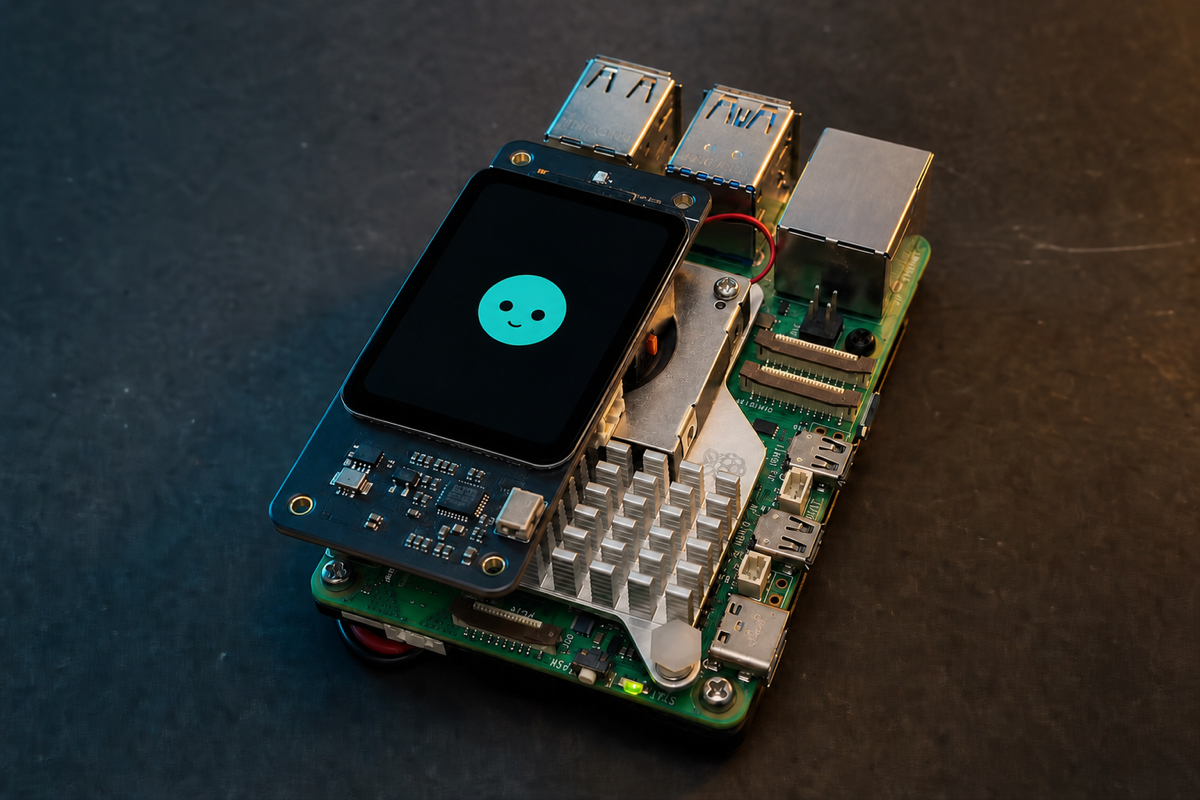
Original demonstration
The tutorial covers the physical stack, Raspberry Pi OS, SSH, Whisplay drivers, the chatbot, Ollama, Whisper, Piper, PiSugar power management, an offline conversation test and automatic startup.
Video: Offline AI on Raspberry Pi 5 — It Talks, Thinks locally without Wi-Fi! (Complete Tutorial) by Jdaie Lin. LocalClaw does not rehost or modify the video.
Hardware gate
The creator recommends 8 GB or more because the combined AI stack uses roughly 4 GB in the demonstrated configuration. Active cooling is essential. The battery, cooler, stackable GPIO header and Whisplay HAT occupy the same compact area, so confirm clearances before tightening anything.
Verification boundary: LocalClaw checked the parts and demonstrated flow against the original tutorial, PiSugar hardware documentation and the current Whisplay chatbot, driver and power-manager sources. The commands below use the current maintainer path at the reviewed commits rather than copying an older command transcript from the video. Reviewed runtime commit: ee7301b2f769. LocalClaw has source-reviewed this guide but has not physically reproduced this build.
Parts list
These buttons open regional Amazon searches through LocalClaw. Confirm the exact specifications on the seller page before ordering.
Use the 8 GB model shown in the tutorial. The complete Whisper, Ollama and Piper stack uses several gigabytes and should not be presented as a comfortable 4 GB build.
This combines the small LCD, microphones, speaker, RGB LEDs and interaction button used by the assistant. Confirm it includes the speaker and mounting hardware.
Choose the Plus 5000 mAh version documented for Raspberry Pi 5, not the smaller 1200 mAh PiSugar 3 intended for lighter boards.
Local speech and LLM inference sustain CPU load. Confirm the cooler and its fasteners clear the PiSugar underside and the raised Whisplay HAT.
The riser lifts the Whisplay HAT above the cooler while passing all 40 GPIO pins through. Match the pin length and board clearance shown in the video.
Use a reputable card with room for Raspberry Pi OS, build dependencies, the 1.4 GB Qwen package, Whisper weights, a Piper voice and logs.
Use stable wall power while installing and downloading models. The PiSugar battery makes the finished device portable but still needs a suitable charger.
Affiliate disclosure: As an Amazon Associate, LocalClaw earns from qualifying purchases. The original creators do not endorse these purchasing links, and prices or availability may change.
Step-by-step
The video remains the visual assembly reference. This written path independently organizes the current official commands, pins the reviewed chatbot revision and adds checks before each long download.
Use Raspberry Pi Imager to write current 64-bit Raspberry Pi OS to the microSD card. Set a hostname, username, password, Wi-Fi and SSH in Imager before first boot.
Install active cooling on the Pi 5, align the PiSugar 3 Plus underneath, add the 2×20 stackable header and seat the Whisplay HAT above the cooler. Check every pin before applying pressure.
SSH into the Pi, clone the official driver, pin the revision reviewed by LocalClaw, install it and reboot. Run the hardware demo before adding any AI software.
git clone https://github.com/PiSugar/Whisplay.git --depth 1
cd Whisplay
git checkout a695240f866257033414697d47c3aa4c5f9b749c
sudo bash install_driver.sh
sudo reboot
Note: After reboot, return to ~/Whisplay/example, install its requirements and run bash run_test.sh. Do not continue until the display, button, LEDs, microphone and speaker pass the hardware test.
Install the official release-channel power manager, select the PiSugar 3 model when prompted and confirm that the battery service sees the board.
cd ~
wget -O pisugar-power-manager.sh https://cdn.pisugar.com/release/pisugar-power-manager.sh
bash pisugar-power-manager.sh -c release
systemctl status pisugar-server --no-pager
Note: The official manager exposes its local web interface on port 8421. Change its default credentials before exposing that port beyond your trusted LAN.
Clone the application, pin the current reviewed revision, install its system and Python dependencies, then load the Node environment added to your shell.
cd ~
git clone https://github.com/PiSugar/whisplay-ai-chatbot.git
cd whisplay-ai-chatbot
git checkout ee7301b2f7693111ee016f81c48a75d3387a7326
bash install_dependencies.sh
source ~/.bashrc
bash build.sh
Note: The current repository has evolved since the 2025 video. Pinning the reviewed commit keeps the commands and configuration fields on this page reproducible.
Install Ollama and pull Qwen3 1.7B, install Whisper and cache its tiny English model, then install Piper HTTP and download one English voice.
cd ~/whisplay-ai-chatbot
bash scripts/install_ollama.sh
ollama pull qwen3:1.7b
python3 -m pip install -U openai-whisper --break-system-packages
python3 -c "import whisper; whisper.load_model('tiny')"
python3 -m pip install 'piper-tts[http]' --break-system-packages
mkdir -p /home/pi/piper
cd /home/pi/piper
python3 -m piper.download_voices en_US-amy-medium
Note: The /home/pi paths match the official defaults and the creator setup. If your Raspberry Pi username is not pi, use your actual home directory consistently in .env.
Run the official configuration wizard, choose Whisper for ASR, Ollama for the LLM and Piper HTTP for TTS, then verify the critical values in .env.
cd ~/whisplay-ai-chatbot
whisplay configure
grep -E '^(ASR_SERVER|LLM_SERVER|TTS_SERVER|OLLAMA_MODEL|SERVE_OLLAMA|WHISPER_MODEL_SIZE_OR_PATH|PIPER_HTTP_MODEL|ENABLE_THINKING)=' .env
Note: If the wizard does not expose one of these advanced fields, edit .env directly. Never add a cloud API key for this fully local configuration.
Start the application in the foreground, press the Whisplay button, speak a short request and wait for the display and speaker response. Keep this foreground test visible until every stage works.
cd ~/whisplay-ai-chatbot
bash run_chatbot.shTell me a short joke.Give me three ingredients for a pizza.What can I do without an internet connection?Note: The first Whisper and Ollama request is slower because processes and model data are warming up. Thinking mode should remain disabled during this baseline test.
Stop the foreground process, disconnect Wi-Fi or Ethernet, repeat the same voice request, then install the startup service once the offline test succeeds.
cd ~/whisplay-ai-chatbot
bash startup.sh
systemctl status chatbot --no-pager
journalctl -u chatbot -n 100 --no-pager
Expected performance
Private local voice conversation with sequential speech recognition, text generation and speech synthesis. This is a three-stage CPU pipeline on a small computer: Whisper transcribes, Qwen3 generates and Piper synthesizes. It is private and portable, but it will not respond like a cloud smart speaker.
Troubleshooting
Most failures are not model failures. Test the Whisplay hardware, each local engine and the final chatbot as separate layers before enabling automatic startup.
Return to the official Whisplay example test. Recheck the 40-pin alignment, SPI/I2C/I2S driver installation and audio device before debugging Ollama or the chatbot.
Confirm LLM_SERVER=ollama, OLLAMA_MODEL=qwen3:1.7b and OLLAMA_ENDPOINT=http://localhost:11434 in .env. Run ollama list and curl the local Ollama endpoint before restarting the chatbot.
Confirm /home/pi/.cache/whisper/tiny.pt exists and WHISPER_MODEL_SIZE_OR_PATH points to that exact file. Cache the model while online before repeating the offline test.
Confirm both en_US-amy-medium.onnx and its JSON file exist under /home/pi/piper, verify PIPER_HTTP_MODEL uses the matching basename path, then test the Whisplay speaker independently.
Stop the chatbot and inspect cooling, power and GPIO-stack clearance. Use active cooling, a stable supply during setup and do not compress the cooler or battery against another board.
Set ENABLE_THINKING=false and restart the chatbot. Thinking produces more tokens and is an optional demonstration mode, not a requirement for a useful offline voice assistant.
Do not run two managers for the same hardware. The current project recommends registering the chatbot with whisplay-daemon; use the repository's current daemon path or explicitly stop and disable the daemon before choosing legacy chatbot.service mode.
Sources and credit
Jdaie Lin published the complete Raspberry Pi 5 offline build on the PiSugar Studio channel. PiSugar maintains the Whisplay hardware driver, chatbot application and battery manager used by the project. LocalClaw's page is independent and does not imply endorsement by any cited creator, model author or tool maintainer.
License note: The Whisplay chatbot and PiSugar power manager are GPL-3.0; the Whisplay hardware driver and Qwen3 model identify Apache-2.0 licensing. Piper uses GPL-3.0 and OpenAI Whisper uses MIT. LocalClaw links to the original projects and does not redistribute their code, model packages, voice files or video.
Questions
Yes after setup, if Qwen3, the Whisper checkpoint and the Piper voice are already stored locally. Internet is still required to install packages and download those assets. Optional cloud providers or plugins are outside this offline claim.
Jdaie Lin recommends 8 GB or more and reports that the combined AI software uses roughly 4 GB. LocalClaw keeps that demonstrated hardware gate rather than promising a comfortable 4 GB build.
It provides the small LCD, microphones, speaker, RGB LEDs and button used for the assistant interaction, avoiding a collection of separate audio and display peripherals.
Yes, but qwen3:1.7b is the model demonstrated in the tutorial and the only model covered by this guide. Larger models increase memory use and latency; other models may handle thinking or tools differently.
No for a desk-only assistant, but yes for the portable build shown in the video. The PiSugar 3 Plus 5000 mAh is the documented Raspberry Pi 5 option.
No. Jdaie Lin demonstrated the finished device. LocalClaw verified the hardware list, current repositories, model package, licenses and installation path, but has not physically assembled this appliance.