01
Required
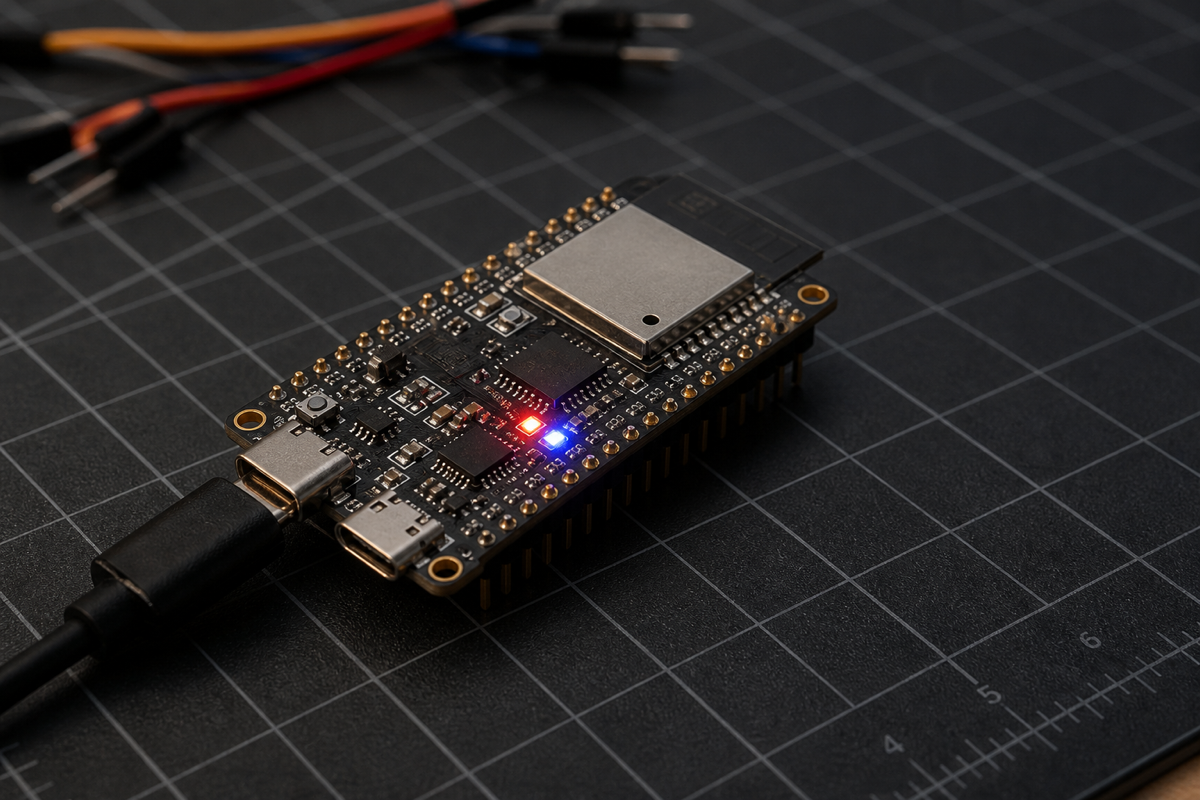
Find on Amazon ESP32-S3 N16R8 development board
Verify the listing explicitly states 16 MB flash and 8 MB octal PSRAM. A generic ESP32-S3 label is not enough.
An offline ESP32-S3 demo that maps natural-language requests to schema-valid tool calls and drives the board's RGB LED.
Original demonstration
The original video remains attached to the project. Playback uses YouTube's privacy-enhanced player and starts only after you choose to play it.
Video: I Can't Believe This AI Model Fits in 14 Megabytes (Needle 2) by Better Stack. LocalClaw does not rehost or modify the video.
Compatibility gate
A generic ESP32-S3 listing is not enough. The reference implementation requires 16 MB flash and 8 MB octal PSRAM. A 2 MB or quad-PSRAM board will not run this documented build.
Verification boundary: LocalClaw checked these requirements and commands against the creator's repository at the reviewed commit and Cactus Compute's model page. Reviewed runtime commit: 61cafad7014a. LocalClaw has source-reviewed this guide but has not physically reproduced this build.
Parts list
These buttons open regional Amazon searches through LocalClaw. Confirm the exact specifications on the seller page before ordering.
Verify the listing explicitly states 16 MB flash and 8 MB octal PSRAM. A generic ESP32-S3 label is not enough.
Use a cable that carries data, not a charge-only cable. The build and serial console both depend on USB data.
The onboard RGB LED is enough for the supplied demo. Add a breadboard and jumpers when adapting the tool call to sensors or servos.
Affiliate disclosure: As an Amazon Associate, LocalClaw earns from qualifying purchases. The original creators do not endorse these purchasing links, and prices or availability may change.
Step-by-step
Commands are preserved where technical accuracy requires it; the explanations, order and checks are independently organized by LocalClaw from the cited primary sources.
The reference port targets one N16R8-class ESP32-S3 board. Confirm 16 MB flash, 8 MB octal PSRAM, and an onboard WS2812 LED on GPIO48.
Install ESP-IDF 5.5 or newer, Python 3, CMake and Git. Complete Espressif's normal toolchain setup before continuing.
Work from the Apache-2.0 repository used in the original demonstration.
git clone https://github.com/andrisgauracs/needle-2-esp32.git
cd needle-2-esp32The helper tools use NumPy, Rich, PySerial, Hugging Face Hub and SentencePiece.
python3 -m venv .venv
.venv/bin/pip install numpy rich pyserial huggingface_hub sentencepieceFetch the official Cactus Compute .cact binary into a local model directory. The model is downloaded from Hugging Face and is not stored in the ESP32 repository.
mkdir -p model
.venv/bin/python -c "from huggingface_hub import hf_hub_download; import shutil; shutil.copy(hf_hub_download('Cactus-Compute/needle2', 'needle2.cact'), 'model/needle2.cact')"Compile the desktop reference engine first. This catches host-side setup problems before the slower microcontroller flash cycle.
cmake -S host -B build -DCMAKE_BUILD_TYPE=Release
cmake --build build -j8
.venv/bin/python tools/needle_tui.py --localLoad your ESP-IDF environment, target ESP32-S3, build the firmware, then replace the sample serial port with the port shown on your machine.
. /path/to/esp-idf/export.sh
cd esp32/needle_demo
idf.py set-target esp32s3
idf.py build
idf.py -p /dev/cu.usbmodemXXXX flash
Note: On Linux, the serial port is commonly /dev/ttyUSB0 or /dev/ttyACM0. On macOS, list candidates with ls /dev/cu.usb*.
Return to the repository root and write the model binary at the partition offset used by the reference project.
cd ../..
esptool.py --chip esp32s3 -p /dev/cu.usbmodemXXXX -b 921600 write_flash 0x210000 model/needle2.cact
Note: The model flash takes roughly three minutes in the creator's documented setup and only needs repeating when the model changes.
Start the serial TUI, wait for the one-time prompt priming, then ask for an LED action in natural language.
.venv/bin/python tools/needle_tui.py --serial /dev/cu.usbmodemXXXXFlash a red light for 3 seconds.Shine a purple light for 7 seconds.What is the capital of France?Note: The final prompt is intentionally outside the tool schema. A correct result is an empty tool call rather than a chatbot answer.
Expected performance
Tool calling, device actions and structured extraction — not general chat. The documented ESP32-S3 port is compute-bound, so treat it as an offline device-action demo rather than a conversational assistant.
Troubleshooting
The reference repository documents several silent configuration failures. Check these before changing the inference engine.
Use the UART bridge USB port and leave the ESP-IDF console selection at its default. Enabling USB-Serial/JTAG for the console can make the program appear silent.
Confirm the board has 8 MB octal PSRAM and that CONFIG_SPIRAM_MODE_OCT=y plus CONFIG_SPIRAM_SPEED_80M=y are active.
Check that CONFIG_ESP_DEFAULT_CPU_FREQ_MHZ_240=y is applied. ESP-IDF may otherwise default the ESP32-S3 to 160 MHz.
Needle 2 is constrained by the tool schema and its descriptions. Make field descriptions short and explicit, and remember that it is a dispatcher rather than a general chatbot.
Sources and credit
Better Stack published the original demonstration. Andris Gauracs built and documented the independent ESP32-S3 inference implementation. LocalClaw's page is independent and does not imply endorsement by any cited creator, model author or tool maintainer.
License note: The ESP32 implementation and Needle 2 materials cited here identify Apache 2.0 licensing. LocalClaw links to the original repositories and does not redistribute their source code or model binary on this page.
Questions
No. This port requires an N16R8-class ESP32-S3 with 16 MB flash and 8 MB octal PSRAM. Smaller or quad-PSRAM variants are not compatible with the documented build.
No. Needle 2 is trained for tool calling, device actions and structured extraction. It selects a declared function and fills its arguments; it is not trained for general conversation or world knowledge.
No. Inference and the LED action run locally on the microcontroller. Internet access is needed during setup to download the source dependencies and model binary.
The documented board reaches about 1.87 tokens per second. Requests take about 25 seconds without reasoning and about 47 seconds with reasoning.
Yes. The repository documents a three-part customization flow: describe the tool schema, write a device handler and register that handler in the firmware.